
Command as infrastructure: Designing stability under volatility
Executive Summary
- Designed a deterministic command-based interaction layer to stabilize navigation under roadmap volatility.
- Implemented a context-aware frontend routing tree with explicit execution rules.
- Built a weighted similarity ranking system with multilingual alias isolation.
- Structured coexistence between NLP-driven generation and deterministic operational control.
- Delivered without analytics instrumentation or formal research cycles.
BePeople was building a minimal AI-driven BI platform where users could generate dashboards through natural language. The vision was clarity and speed — not feature density.
The complexity did not come from scale, but from volatility. Workflows were designed to remain tight and coherent, yet incremental feature requests continuously threatened that balance. Small additions risked reshaping navigation, fragmenting interaction patterns, and eroding structural clarity.
Under time pressure and without formal research or analytics, the system needed a way to absorb change without constant redesign.
The Command Palette was introduced not as a convenience feature, but as interaction infrastructure: a deterministic routing layer capable of integrating new capabilities while preserving the integrity of the interface.
Minimalism under volatility
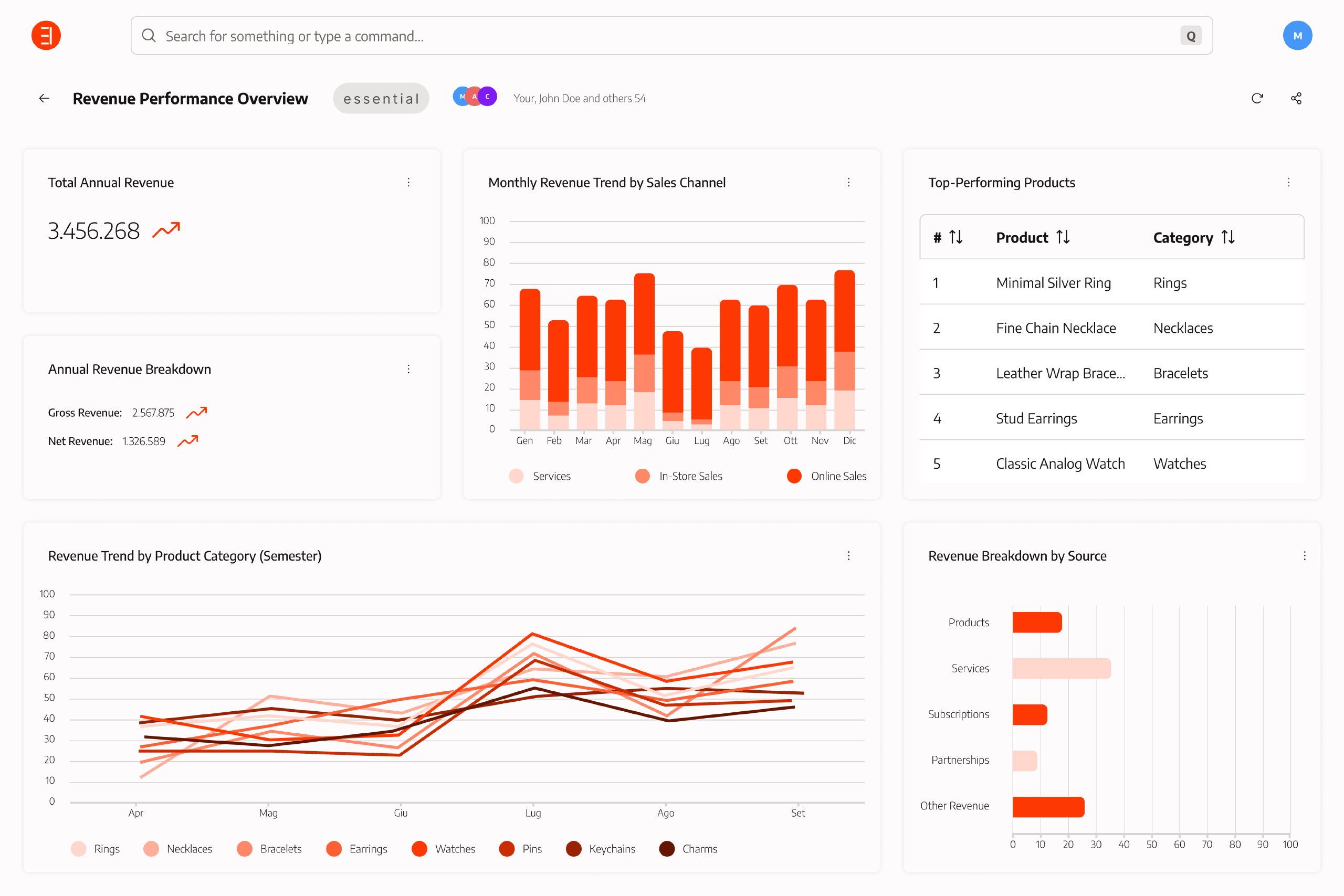
BePeople was a SaaS platform that allowed business users to query their company data in natural language and automatically generate analytical widgets inside shared workspaces. Instead of building dashboards manually, users could describe what they wanted to see and receive a structured visualization in return.
A system designed to stay narrow
The product was intentionally minimal. It avoided deep configuration panels and dense control systems, favoring directness between intent and result. The promise was simple:
Ask for the data. See the result.
Workflows were designed to remain tight and predictable. Navigation was not meant to scale through additional menus, but through clarity.
The system was not complex by volume. It was intentionally narrow by design — and therefore sensitive to incremental change.
Incremental change as structural risk
Complexity emerged not from feature breadth, but from continuous incremental requests.
After a workflow had been carefully shaped, new variations would be introduced:
- an additional export format
- a new visualization mode
- an alternative workspace type
- a shortcut for an admin debug feature
- a special case requested by a specific client
Each addition was small. Individually reasonable. Collectively destabilizing.
Redesigning navigation every time a new function appeared would have gradually eroded coherence. Adding visible controls for each variation would have expanded the interface surface and fragmented interaction patterns.
The problem was not scale. It was entropy.
Constraints as architectural drivers
The Command Palette did not emerge in a vacuum. Its design was shaped by explicit technical and organizational constraints.
No operational NLP layer Because the platform already relied on GPT to translate natural language into SQL for data generation, we initially explored the possibility of extending natural language parsing to operational commands (e.g., “share this workspace with marketing”, “duplicate last month’s report and export as CSV”). However, introducing a second NLP layer for routing operational intent would have required:
- additional backend orchestration
- state synchronization between UI context and language parsing
- ambiguity resolution strategies
- increased architectural complexity
Given time pressure and infrastructure limitations, this approach was rejected. The Command Palette therefore had to remain deterministic. Intent recognition for operations was handled through explicit command structures and contextual filtering, not semantic interpretation.
No instrumentation or research loop The product lacked a tracking layer and formal research cycles. There was no reliable quantitative feedback to iteratively validate interaction changes. This increased the importance of predictability and structural clarity: the system needed to behave consistently even without behavioral analytics to refine it post-release.
Volatile roadmap and incremental expansion Feature requests were frequently introduced after workflows had been structured. The interaction system had to tolerate incremental additions without requiring repeated navigation redesign. This constraint directly influenced the decision to treat the Command Palette as extensible infrastructure rather than as a convenience shortcut.
Command as a scaling mechanism
The introduction of a Command Palette was not motivated by aesthetic preference or trend alignment. It represented a deliberate shift in how access to system functionality was organized.
The core question was not how to improve navigation, but how to prevent it from growing as the product evolved.
From spatial expansion to centralized access
Graphical interfaces typically scale through spatial expansion. As functionality increases, new controls are added: buttons, contextual menus, panels, nested sections. This model is effective when the feature set is stable, but it becomes fragile when the system is subject to continuous incremental change.
Research in human-computer interaction has long highlighted this tension. In The next UI breakthrough: Command lines (2007), Don Norman observes that while graphical interfaces improved usability by emphasizing recognition over recall, they tend to accumulate visible complexity as systems grow. Command-style interaction re-emerges in such contexts not as nostalgia for the CLI, but as a compression mechanism: a way to centralize access without multiplying visual entry points.
This perspective aligned with the structural needs of BePeople. The objective was not to eliminate hierarchy or remove graphical affordances, but to introduce a parallel layer capable of concentrating interaction entry into a single, consistent surface.
A hybrid model: recognition supported by recall
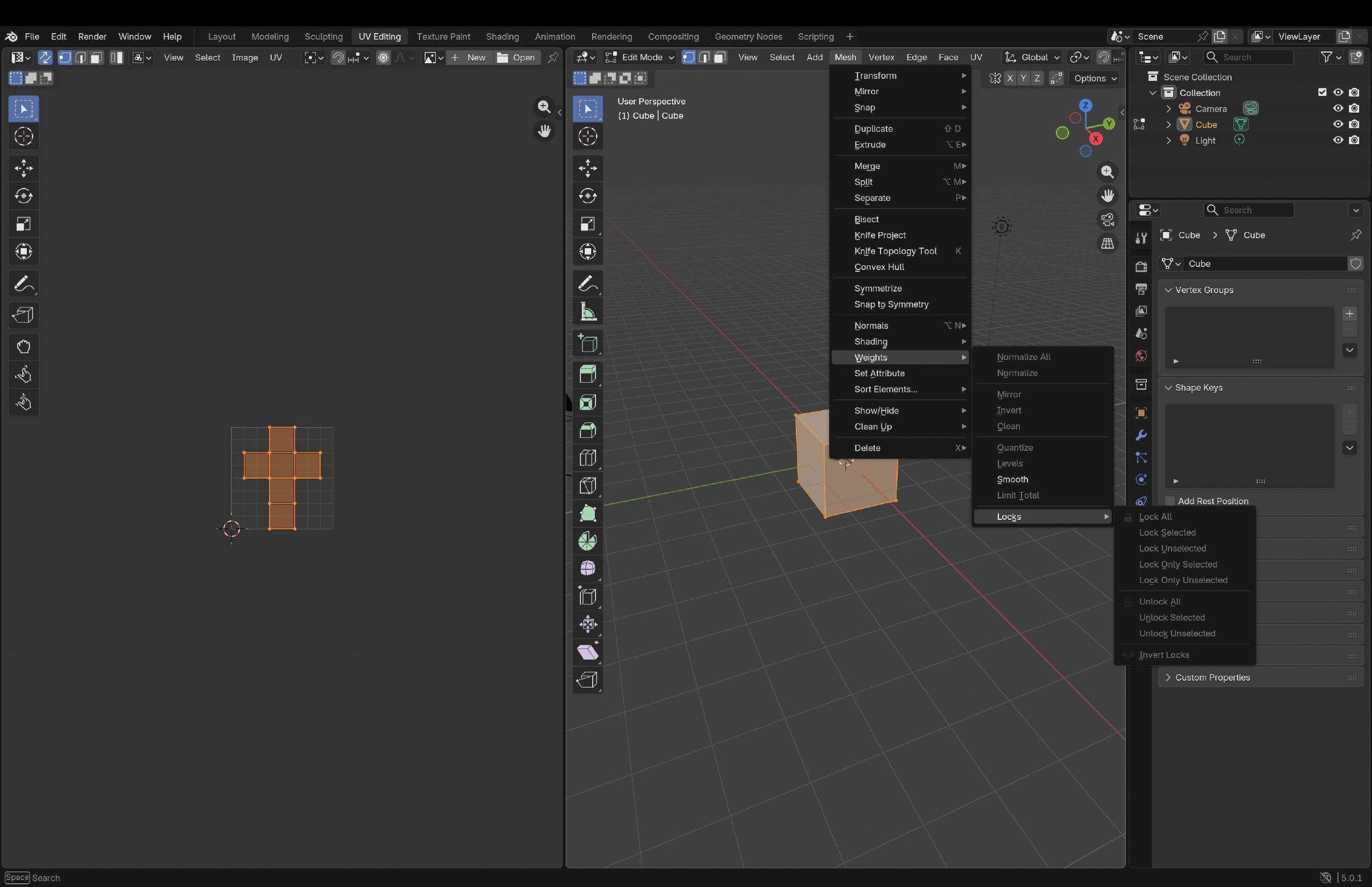
The Command Palette was conceived as a hybrid interaction layer.
Typing serves as an entry mechanism that reduces the available action space. However, the system does not rely on memorized syntax or strict command grammar. Instead, structured lists, grouping, contextual filtering, and iconography support recognition once the narrowing process begins.
In this sense, recall initiates interaction, while recognition resolves it.
| Dimension | GUI | CLI | Command Layer |
|---|---|---|---|
| Interaction logic |
|
|
|
| Discoverability |
|
|
|
| Density model |
|
|
|
| Scalability under volatility |
|
|
|
This balance was essential. BePeople’s users were not expected to learn command vocabularies, nor to navigate deep interface trees for routine operations. The palette provides a compressed access surface without abandoning the affordances of graphical interaction.
The decision to preserve a sequential command structure was also influenced by keyboard-first interaction clarity. Maintaining a deterministic progression simplified focus management and ensured consistent navigation without introducing graph-like complexity. Flexibility was intentionally constrained in favor of structural predictability.
Separating generative and operational intent
Another strategic consideration concerned the coexistence of two distinct interaction domains within the same surface.
On one side, the platform already supported natural language for data generation. Users could describe analytical needs and rely on a semantic pipeline to produce structured visualizations. This domain tolerates ambiguity and probabilistic interpretation.
On the other side, operational actions such as sharing, duplicating, editing, or exporting require explicit structural resolution. Ambiguity in this context introduces risk rather than flexibility.
Rather than extending semantic interpretation to all commands, the design maintained a conceptual separation:
- natural language processing for generative actions
- deterministic routing for operational control
This separation ensured that perceived intelligence did not compromise structural predictability.
Compression as a structural principle
The Command Palette was therefore not treated as a productivity enhancement or shortcut layer. It was conceived as a structural compression mechanism.
By centralizing action entry into a single surface, the system gained a stable integration point for future capabilities. New commands could be introduced without expanding visible navigation or restructuring interface layout. The palette became a controlled extensibility layer rather than an optional convenience.
The following chapter details how this principle was implemented through deterministic, context-aware routing in the frontend architecture.
Deterministic routing architecture
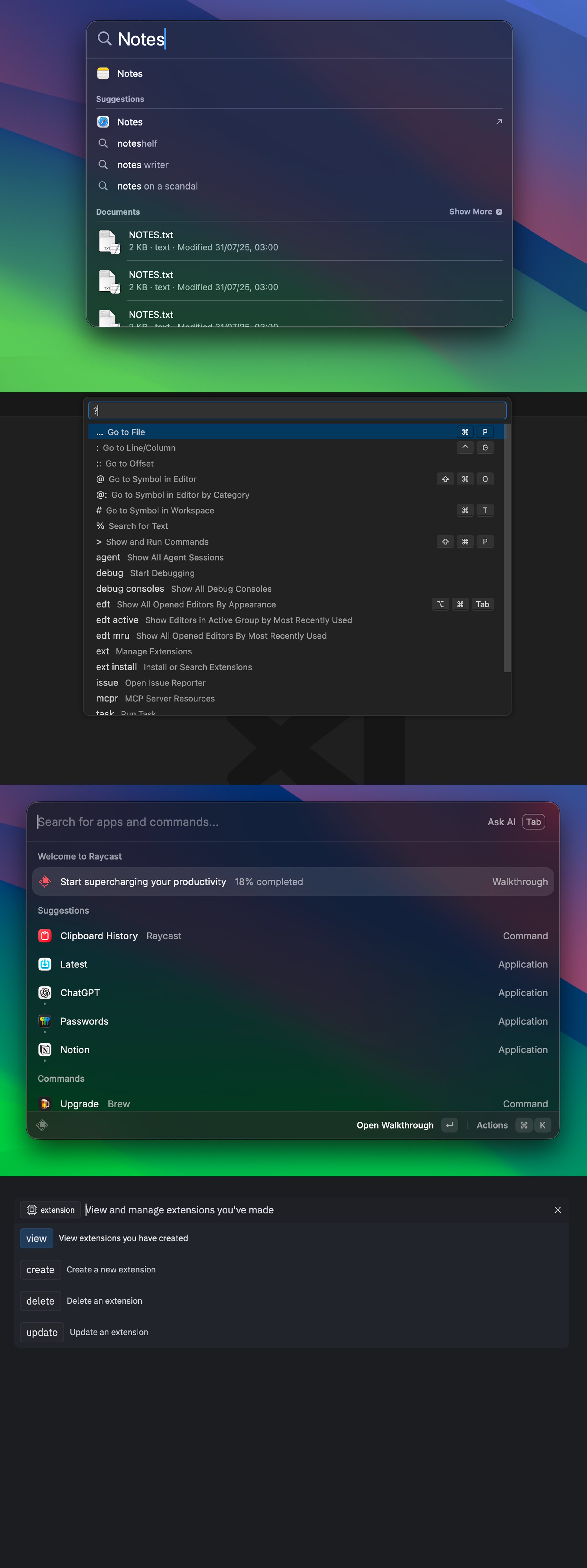
The Command Palette was implemented as a deterministic routing system fully managed on the frontend. The objective was not to introduce semantic inference for operational commands, but to design an explicit and scalable interaction architecture capable of evolving alongside the product.
Although deeper backend orchestration was initially considered, the final solution deliberately centralized command logic in the browser. This ensured faster iteration and reduced dependency on backend prioritization.
%%{init: {
  "flowchart": { "defaultRenderer": "elk", "htmlLabels": false },
  "elk": {
    "algorithm": "layered",
    "direction": "TB",
    "edgeRouting": "ORTHOGONAL",
    "spacing": { "nodeNode": 8, "edgeEdgeMin": 4, "edgeNodeMin": 4, "componentComponent": 8 },
    "layered": {
      "spacing": { "nodeNodeBetweenLayers": 8, "edgeNodeBetweenLayers": 4 },
      "crossingMinimization": { "strategy": "LAYER_SWEEP" },
      "nodePlacement": { "strategy": "NETWORK_SIMPLEX" }
    }
  },
  "themeVariables": { "fontSize": "18px" }
}}%%

flowchart TB

    subgraph Discovery [Phase 1: Input & Ranking]
        U(["User: Type input"]) --> CTX["Frontend: read UI context"]
        CTX --> R["Frontend: filter + score commands and Search item"]
        R --> LIST["User: select ranked item"]
    end

    subgraph Processing [Phase 2: Deterministic Routing]
        LIST --> TYPE{"Selected item"}
        TYPE -->|"Operational command"| TREE["Frontend: navigate decision tree"]
        TYPE -->|"Search item (semantic query)"| BACK["Backend: NL → SQL via GPT"]

        TREE --> P{"Parameters resolved?"}
        P -->|"No"| ASK["User: resolve parameter(s)"]
        ASK --> CTX
        P -->|"Yes"| CONF{"Confirmation required?"}
    end

    subgraph Execution [Phase 3: Explicit Execution]
        CONF -->|"Yes"| SUB["User: confirm action"]
        CONF -->|"No"| EXEC_TRIGGER["Selection triggers execution"]

        SUB --> EXEC
        EXEC_TRIGGER --> EXEC
        BACK --> EXEC

        EXEC["Execute action (API call)"] --> FEED["Frontend: show toast feedback"]
        FEED --> DONE(["Done"])
    end
Context-aware command surface
The command surface is not static. The set of available operational commands depends on the current UI context.
Two primary states influence availability:
- homepage
- inside a workspace
When the user is on the homepage:
- only workspace-level commands are exposed
- widget-level operations are not available
When the user is inside a workspace:
- workspace-level commands remain available
- widget-level commands are introduced
- some commands alter their behavior depending on scope
This context-based pruning prevents irrelevant operations from surfacing and ensures that routing begins from a structurally valid command set.
flowchart TD
    State["UI Context"] -->|Homepage| HomeCmd["Workspace Commands"]
    State -->|Workspace| WsCmd["Workspace + Widget Commands"]

    HomeCmd --> DupHome["Duplicate → Select Workspace(s)"]
    WsCmd --> DupWs["Duplicate → (Workspace) or (Widget List)"]
Root-level architecture: parallel intent groups
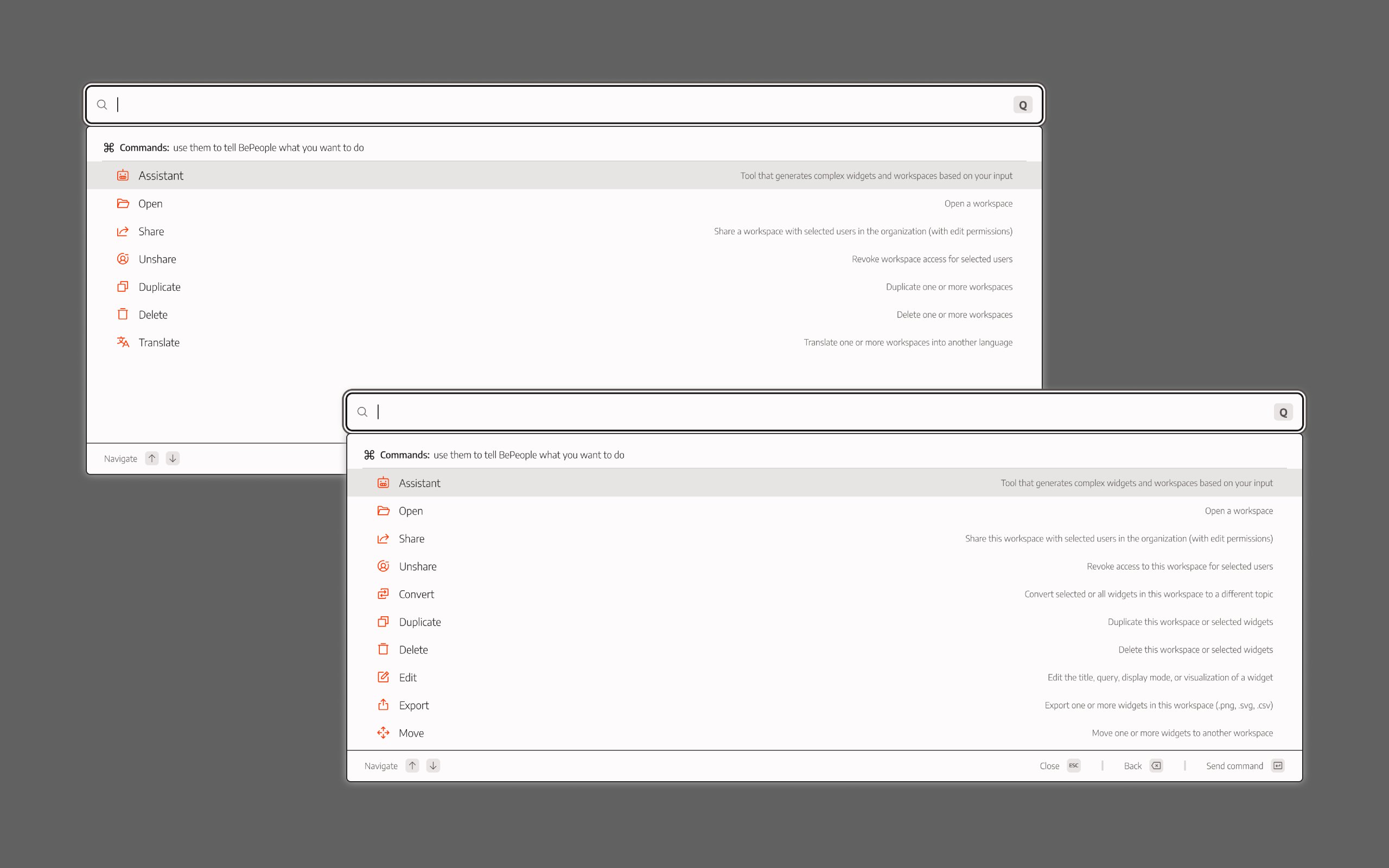
At the root level, the palette does not immediately descend into a command tree. Instead, it evaluates three structural groups in parallel — but not symmetrically.
These groups are not alternative interpretations of intent. They represent distinct structural entry points into the system.
The three root-level groups are:
- New widget — a persistent creation action embedding the input string; selecting it generates a new widget
- Operational commands — actions such as Share, Delete, Edit, Export
- Workspaces — existing entities that can be opened directly
New widget is always structurally available as long as input exists. It does not depend on the presence of pre-existing entities.
The system does not classify user intent at this stage. It exposes structurally valid possibilities and waits for explicit user selection.
Hierarchy begins only after a command is chosen.
flowchart TB

    Input["User types input"]

    Input --> NW["New widget\n(creation action)"]
    Input --> Cmd["Operational Commands"]
    Input --> Ws["Workspaces"]

    NW --> Select["User selects item"]
    Cmd --> Select
    Ws --> Select

    Select --> Route{"Item type?"}

    Route -->|New widget| ExecNA["Send NL query → Generate widget"]
    Route -->|Command| Tree["Enter deterministic decision tree"]
    Route -->|Workspace| Open["Open selected workspace"]
Deterministic decision tree, execution rules and state management
Once an operational command is selected, the system transitions into a structured decision tree. Each node represents an explicit parameter. Branching depends on:
- the selected command
- the current UI context
- previously resolved parameters
The same command may generate different branches depending on context. For example the command Duplicate:
- From the homepage → The user selects one or more workspaces to duplicate.
- From inside a workspace → The user can:
- duplicate the entire workspace, or
- duplicate selected widgets into the current workspace
This context-driven branching is handled deterministically by reading UI state and selecting the appropriate path in the tree.
Parameter resolution proceeds sequentially. At each step:
- a context-specific list is generated
- the user selects the next parameter
- unrelated branches are structurally excluded
Execution follows explicit structural rules:
- Single-selection terminal nodes: Execution occurs immediately upon final selection.
- Multi-selection flows: Selections are accumulated and execution requires explicit confirmation.
In all cases, execution is user-triggered. There is no autonomous submission.
flowchart TD

    Command["Selected Command"] --> ContextLogic["Context-driven branch selection"]

    ContextLogic --> ParamList["Generate context-specific list"]

    ParamList --> More{"More parameters required?"}
    More -->|Yes| Resolve["User selects parameter"]
    Resolve --> More

    More -->|No| ExecRule{"Single or Multi selection?"}

    ExecRule -->|Single| Execute["Execute on final selection"]
    ExecRule -->|Multi| Confirm["Manual confirmation required"]

    Confirm --> Execute
    Execute --> Feedback["Toast feedback"]
Execution feedback is currently implemented through toast notifications. While sufficient for confirming API success or failure, more robust object-level anchoring mechanisms — including contextual highlighting and automatic relocation to affected elements — were designed but not fully implemented.
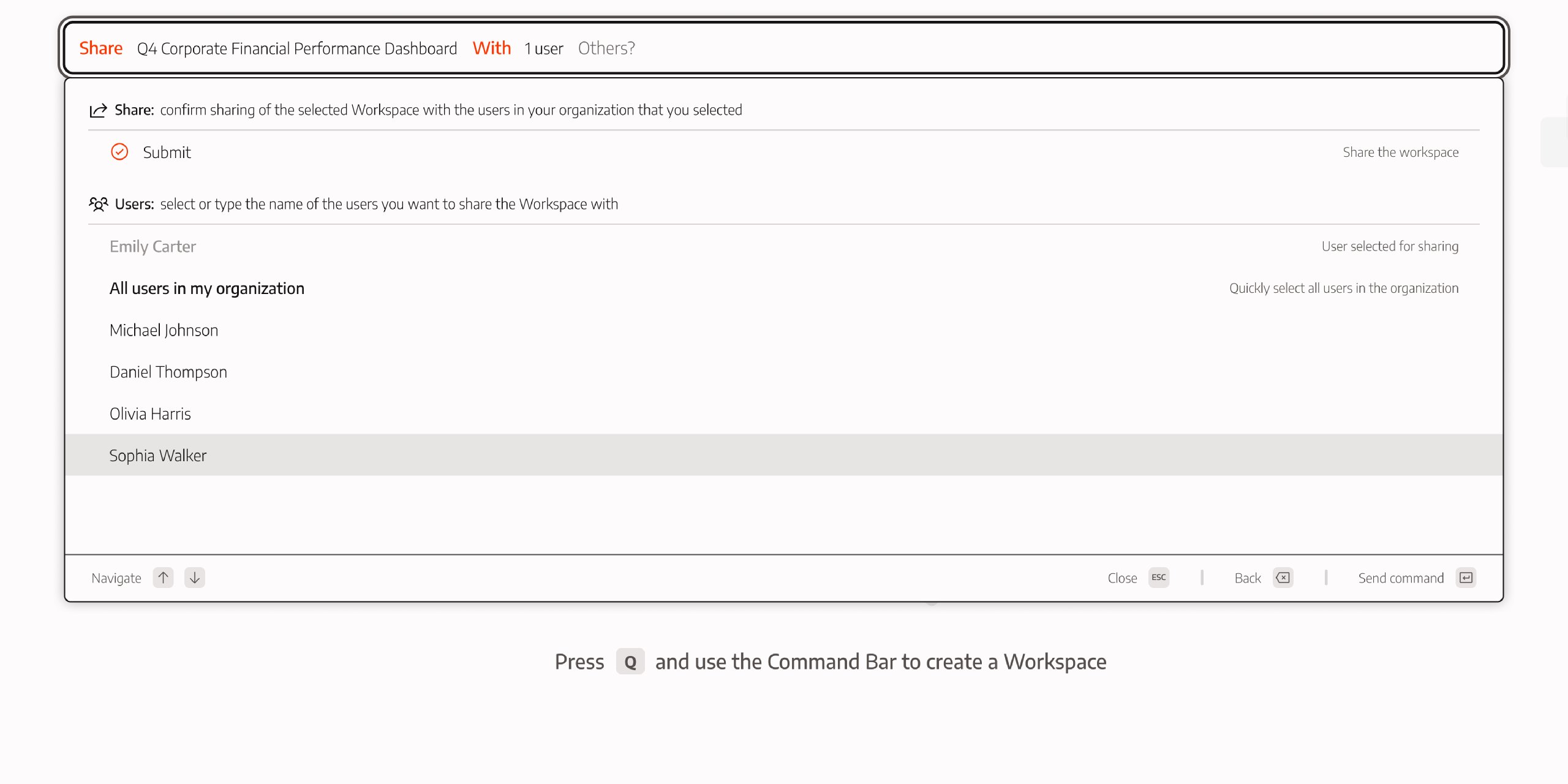
Multi-selection flows require persistent state visibility. Two mechanisms support this:
- Pinning: selected items remain visible in a dedicated area.
- Exclusion from filtering: selected items are removed from the active result pool to prevent duplication.
This allows iterative refinement of a selection set without losing clarity of the operation’s current state.
Architectural properties
This routing model provides several structural advantages:
- context-aware command availability
- deterministic branching without inference
- predictable execution behavior
- scalable extension through new tree nodes
- coexistence of operational and semantic intent
At the architectural level, the system is explicit, structural, and user-controlled. Perceived intelligence emerges from structured option surfacing and feedback clarity rather than from routing inference.
Ranking and structured discoverability
Before any deterministic path unfolds, the system must decide what surfaces. Visibility is not neutral — it is computed.
The Command Palette does not interpret intent. It evaluates structural similarity between the input string and the available candidates, filters weak matches, and orders the remaining results.
Discoverability and action generation are therefore governed by weighted similarity — not semantic inference.
Similarity model & threshold filtering
Each candidate — operational command or workspace — is evaluated using fuzzy similarity across its label and alias set. Matching is continuous rather than binary, producing a score that reflects structural closeness to the input.
To preserve precision and prevent noise, a minimum score threshold is applied. Candidates below this cutoff are excluded from rendering entirely. Only items exceeding the threshold are allowed to surface within their respective group.
Root-level groups remain structurally stable. New widget, operational commands, and workspaces are not reclassified based on inferred intent; they are evaluated independently within fixed group boundaries.
The ranking pipeline is intentionally simple:
- similarity computation
- threshold filtering
- ordered rendering
flowchart TB

    Input["Input string"]

    Input --> Cmd["Operational Commands"]
    Input --> Ws["Workspaces"]
    Input --> NW["New widget\n(persistent creation action)"]

    Cmd --> CmdScore["Similarity scoring"]
    Ws --> WsScore["Similarity scoring"]

    CmdScore --> CmdThresh{"Above threshold?"}
    WsScore --> WsThresh{"Above threshold?"}

    CmdThresh -->|Yes| CmdVisible["Visible commands"]
    WsThresh -->|Yes| WsVisible["Visible workspaces"]

    NW --> NWVisible["Always structurally available"]

    CmdVisible --> Render["Rendered result list"]
    WsVisible --> Render
    NWVisible --> Render
This produces predictable behavior:
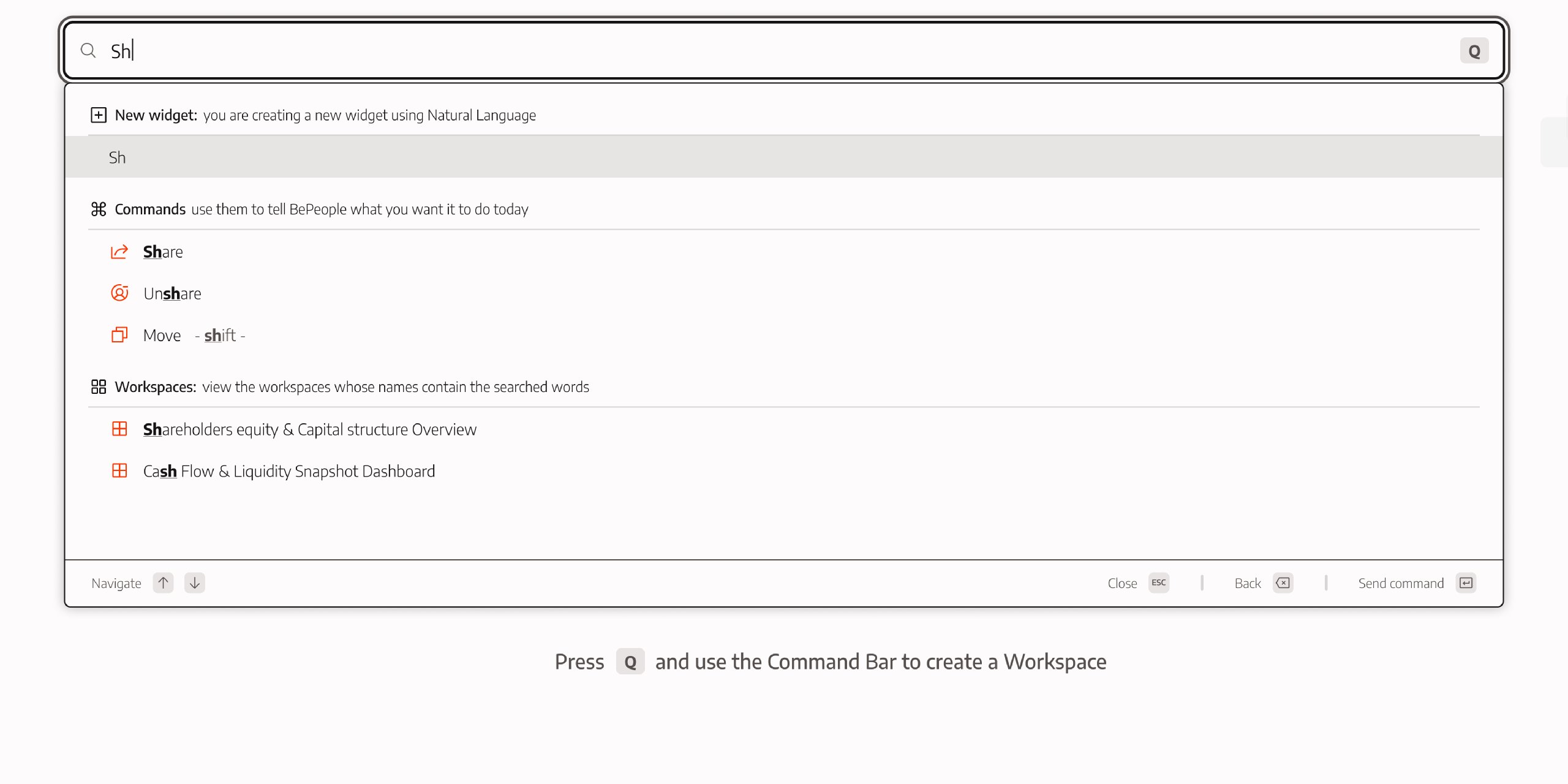
- short, verb-oriented input favors operational commands
- entity-like input favors workspace names
- longer descriptive input reduces similarity to short labels
- weak correlations never surface
Multilingual alias architecture
The platform supports six interface languages. Command labels and alias mappings adapt dynamically to the selected language.
Each command includes:
- a localized label
- a language-specific alias set
Alias sets are intentionally isolated per language. Merging all multilingual aliases would inflate match density and reduce ranking predictability, particularly for short inputs.
English aliases remain globally active as a controlled secondary vocabulary layer. This ensures:
- continuity for power users operating with English terminology
- resilience in case of language mismatch
Scoring evaluates localized and English fields simultaneously. The strongest structural similarity determines ranking, without merging full multilingual vocabularies.
New widget as a creation action
At the root level, New widget is not a generic search fallback. It is a structurally persistent creation action.
Unlike operational commands and workspaces — which reference existing entities — New widget is directly tied to the input string. Selecting it means sending the input to the backend and:
- triggers the NL → SQL pipeline
- generates a new widget
- inserts it into the current workspace
Its availability does not depend on matching a predefined label. As long as input exists, the creation action remains structurally valid.
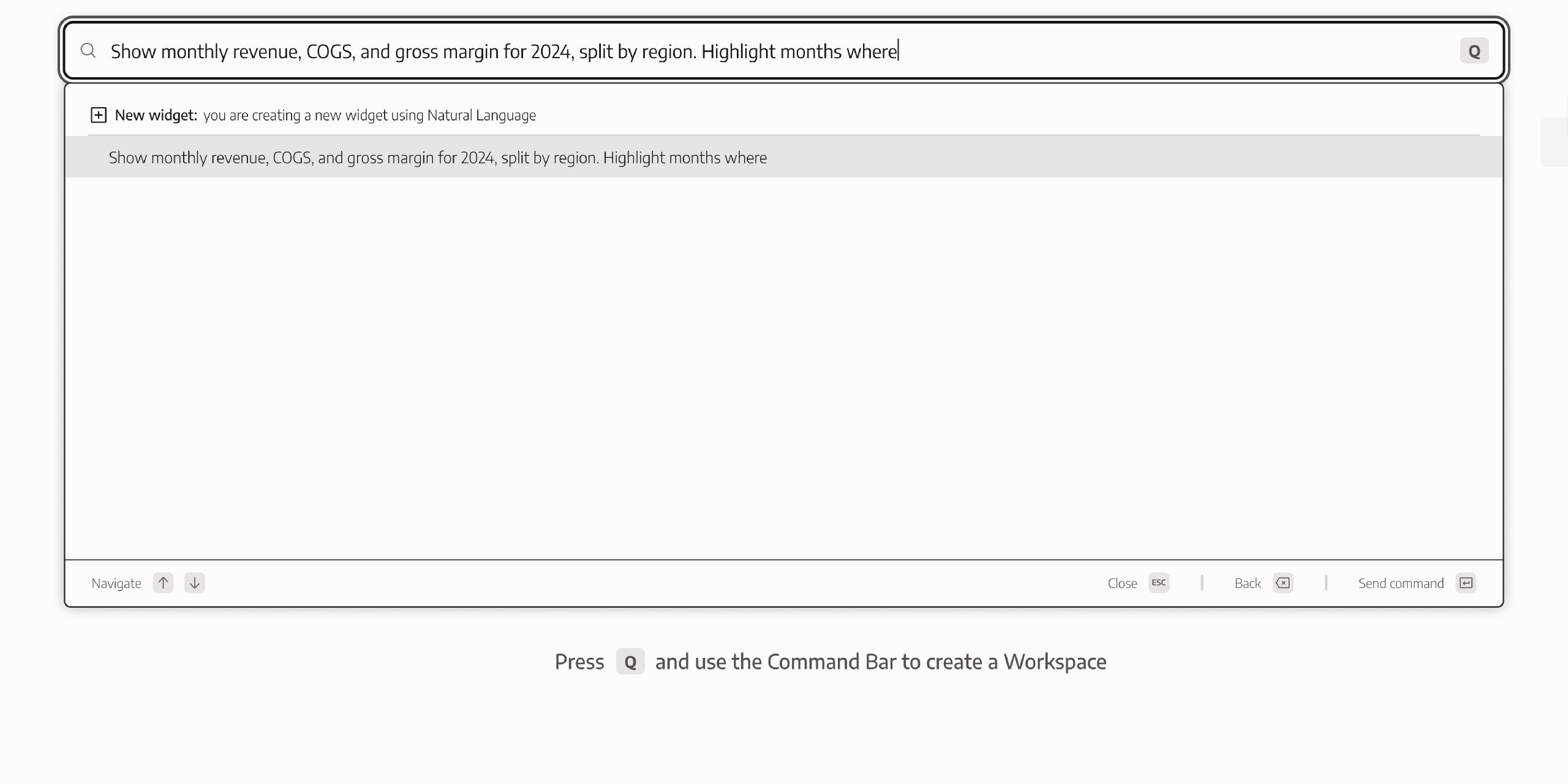
Similarity scoring therefore affects the groups differently. Operational commands and workspaces rely on closeness between the input and their labels or aliases. As input becomes longer and more descriptive, similarity to short operational labels decays. Commands and workspaces may fall below the visibility threshold.
New widget, however, does not compete as a matched entity. It operates as a transformation of the input itself. It’s always rendered first. Its position reflects structural priority rather than similarity score. Ranking applies within groups, not between them.
There is no intent classification and no conversational switching. Its prominence with long semantic queries is not the result of inference, but of structural filtering combined with fixed group ordering.
Contextual scoring within generated lists
Once the user selects an operational command, ranking no longer operates across the root-level candidate space. Instead, it applies within the context-specific list generated by the decision tree.
These lists are not filtered subsets of the original root candidates. They are structurally generated collections determined by:
- the selected command
- the current UI context (homepage or workspace)
- the current node in the decision tree
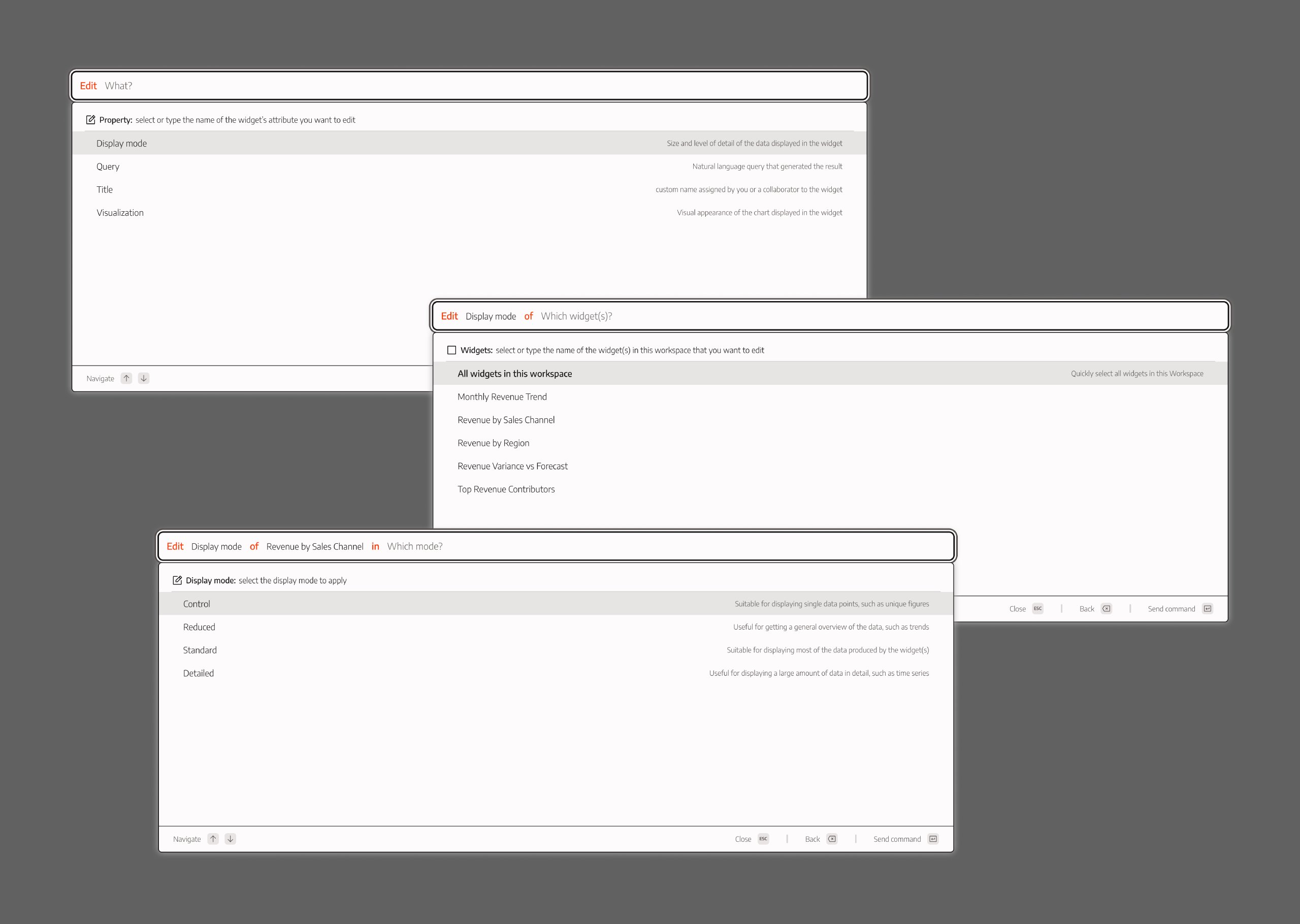
Example: selecting Edit can generate multiple successive lists:
- a list of edit types (e.g., visualization, size, title, filters)
- a list of widgets inside the current workspace
- a parameter list specific to the chosen edit type
- chart types if “visualization”
- preset sizes if “size”
- etc.
Fuzzy scoring remains unchanged, but it runs only within the currently generated list. Combined with deterministic routing (Chapter 3), this produces fast refinement without syntax markers or conversational interpretation.
Execution clarity and perceptual stability
Centralizing interaction into a single command surface simplifies structure. It does not automatically simplify perception.
When actions are abstracted away from their spatial origin, the interface must compensate. Routing may be deterministic and ranking predictable, but users still need to understand what is happening, why it is happening, and where its effects appear.
A compressed interaction layer therefore shifts part of the design effort from navigation logic to perceptual stability.
Recognition scaffolding within a recall-driven surface
Although interaction begins through typing, the palette was never conceived as a strict command-line interface.
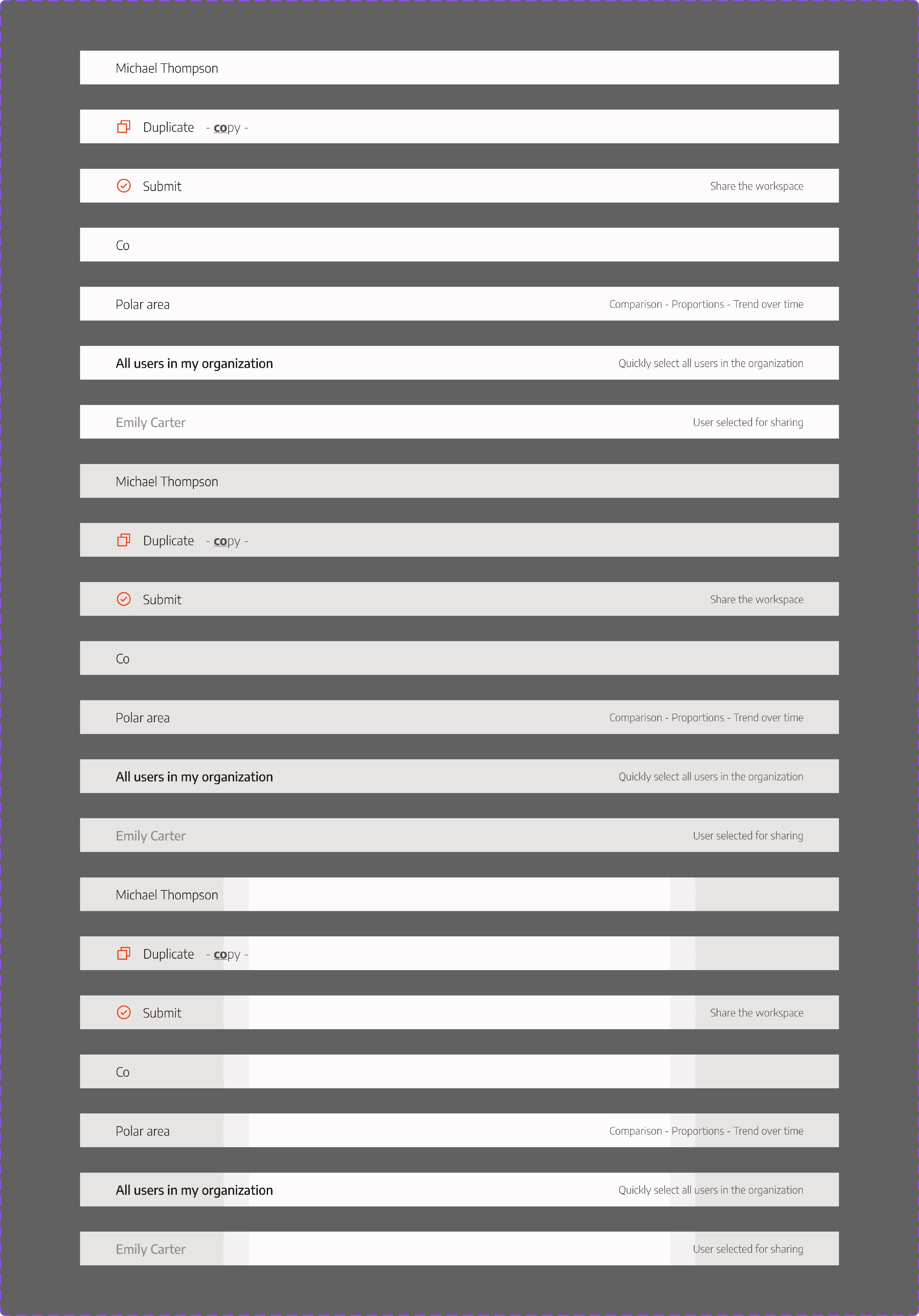
Because fuzzy similarity governs ranking, visual scaffolding becomes essential. Without it, the system would appear arbitrary.
Three mechanisms support recognition:
- Iconography differentiates operational commands from entities and creation actions.
- Match highlighting visually explains why a result appears, exposing the logic of similarity scoring.
- Grouped sections separate structurally distinct intent domains (creation, commands, entities).
These elements are not aesthetic refinements. They make ranking behavior legible.
Typing narrows the space. Recognition resolves it.
The palette remains a graphical surface — compressed, but not textual.
Redundancy as interaction resilience
Centralization improves efficiency, but it increases systemic dependency.
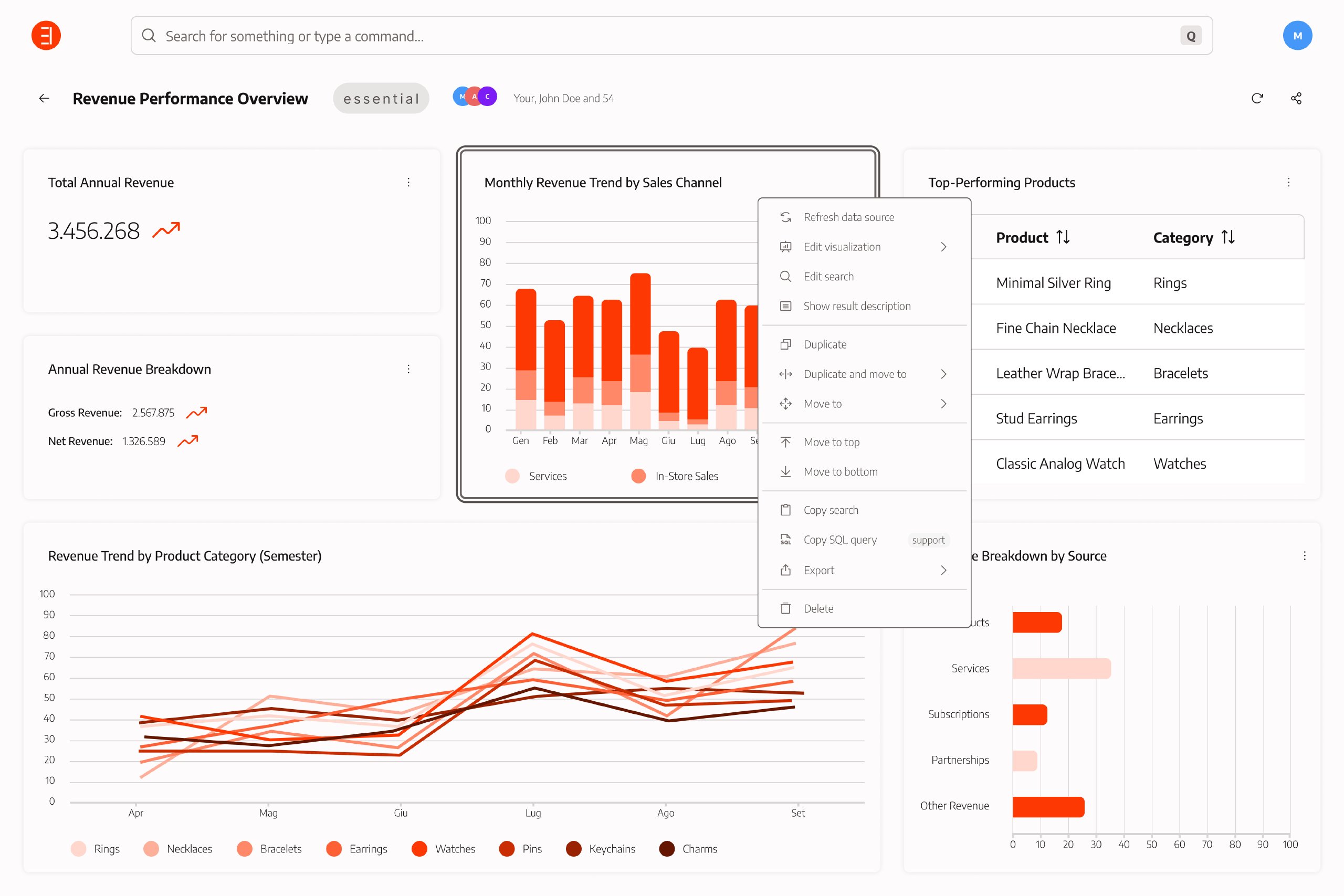
To prevent the palette from becoming the sole gateway to action, core operations remain accessible through contextual widget menus. This redundancy serves two structural purposes:
- support different mental models (keyboard-oriented vs pointer-oriented interaction)
- provide spatial anchoring for operations tied to specific objects
If compression introduces friction, users can revert to object-local interaction. The palette accelerates interaction without monopolizing it.
Density, legibility, and semantic input
The spatial footprint of the palette is not accidental. It is a consequence of the system’s semantic ambition.
The command bar is not a minimal search field. It is a compositional surface where free-form input progressively transforms into structured grammar. Breadcrumb segments and active input coexist within the same container and evolve together.
An experimental wrapping system was designed to allow the breadcrumb+input structure to expand vertically when horizontal space became insufficient. While this could have mitigated truncation, it would not have resolved the underlying constraint.
The system must accommodate:
- Long natural language queries
- Extended workspace and widget names
- Multi-step command grammar
- Explicit semantic tokens that preserve clarity
Even with wrapping, readability degrades in edge cases, and vertical expansion increases the panel’s overall coverage of the dashboard. The issue is therefore not limited to layout mechanics.
It is structural.
If the palette were a simple search bar with short labels, it could be reduced. If it were a strict CLI with compact symbolic commands, it could be collapsed.
Instead, the system prioritizes semantic clarity over compression. Workspace names are descriptive by design. Queries are intentionally expressive. Commands expose their grammar explicitly.
The space requirement emerges from that decision.
Compression is possible only by reducing semantic legibility. The project chose legibility.
Execution without perceptual anchoring
Despite these stabilizing mechanisms, execution feedback remains the most fragile element of the system.
After confirmation, the palette collapses and a toast notification appears in the top-right corner of the interface. The toast confirms only the success or failure of the API call. It does not anchor the user to the affected object.
In operations such as renaming a widget:
- the palette closes
- a toast appears outside the focal area
- the user must recall the widget’s position
- and visually scan the dashboard to verify the change
The system guarantees technical correctness. Interaction closure depends on spatial memory.
This reveals the central tension of compressed interaction: actions are centralized, but their consequences remain spatially distributed.
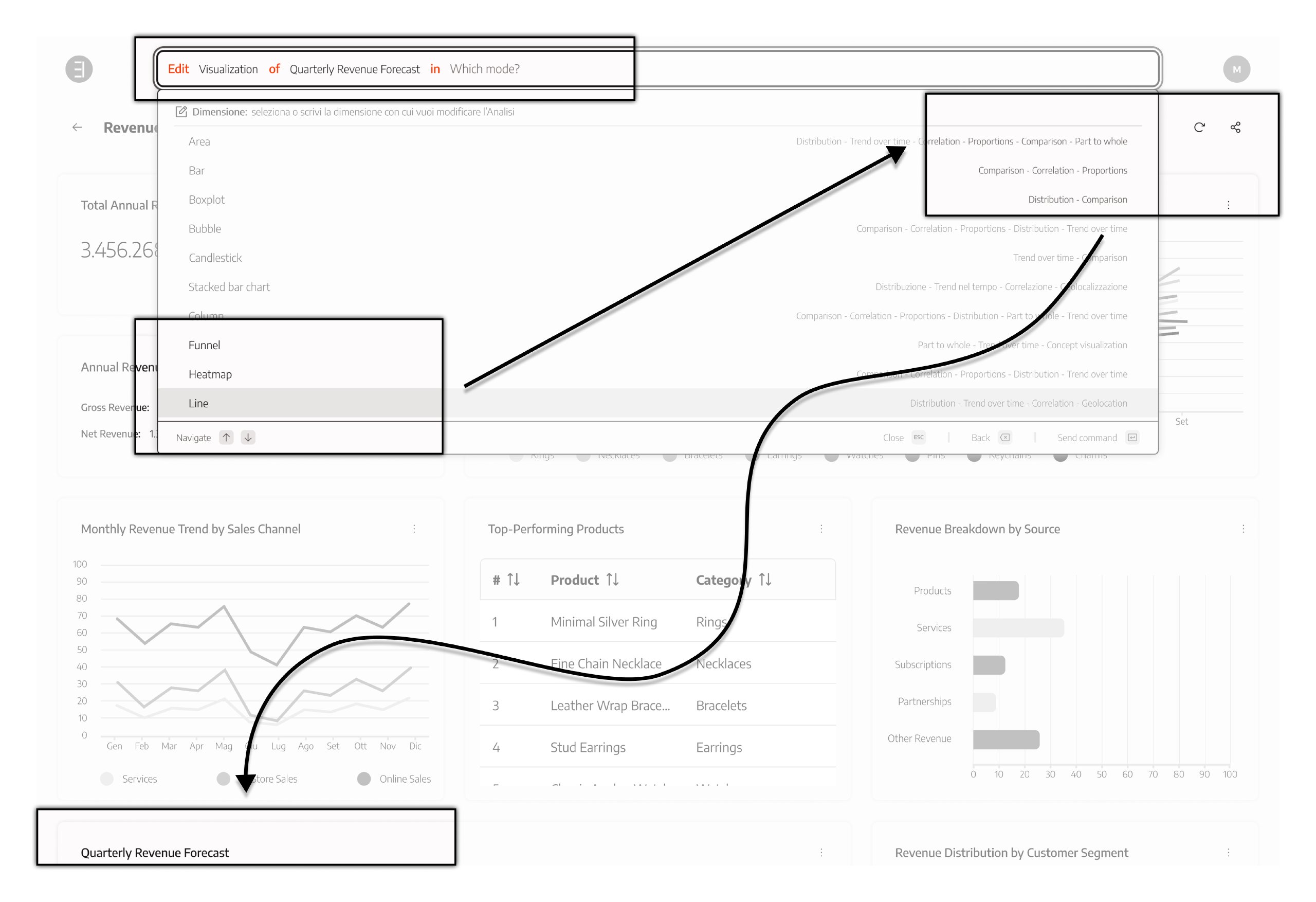
Perceptual anchoring requires more than confirmation — it requires relocation or highlighting of the affected object, which the current implementation does not fully provide.
Designing under constraints and the resulting trade-offs
The Command Palette did not emerge in isolation.
Its deterministic structure — sequential routing, explicit parameter resolution, structural grouping — was a deliberate architectural decision. At the same time, its implementation unfolded within real product constraints: shifting priorities, limited development bandwidth, and an interface not originally designed around a centralized control layer.
The result is a system that is conceptually coherent but uneven in execution. Some tensions are structural. Others are the consequence of incomplete integration.
Understanding the difference is critical.
Deterministic routing and keyboard clarity
The palette operates as a sequential tree: action selection, parameter resolution, confirmation. This progression is deliberate. It guarantees:
- predictable progression
- clear backward navigation
- deterministic state transitions
- full keyboard operability
A user can type to narrow, move through results with arrow keys, confirm with Enter, and exit with Escape. Interaction remains linear, consistent, and mode-free.
A graph-based model could increase flexibility. It could:
- reduce intermediate steps
- allow lateral parameter jumps
- decrease cognitive load when using a mouse
- enable parallel adjustments
However, that flexibility introduces complexity in focus management and shortcut orchestration. Keyboard navigation would require multiple anchors, conditional transitions, and more intricate state handling.
The sequential tree constrains lateral freedom. It preserves deterministic clarity and accessible keyboard flow.
This is a structural prioritization, not an omission.
Execution visibility: designed but incomplete
A central tension lies between where actions are composed and where their effects appear.
The palette centralizes intent. The dashboard distributes consequence.
Commands may affect multiple subjects — widgets or workspaces — while confirmation remains detached from them. This risks weakening the visibility of system status.
The architecture anticipated this gap. It included the design of:
- execution anchoring (auto-focus and scroll to affected elements)
- contextual highlighting of impacted objects
- pre-execution highlighting during command composition
These mechanisms were conceived. They were not fully implemented.
Without anchoring, users must manually reconnect intent and visible outcome. With it, the perceptual gap would narrow significantly.
This is not a flaw of deterministic interaction. It is the most significant unfinished component of the model.
Spatial integration: overlay vs structural embedding
To preserve dashboard stability, the palette was implemented as an overlay. This avoided layout reflow and prevented shifting analytical content.
The spatial footprint of the palette is primarily horizontal before it becomes vertical.
The command requires space for:
- a semantic breadcrumb describing the structured action
- an input field capable of handling long queries
- extended widget and workspace names
Preserving semantic clarity without truncation demands width. That horizontal requirement propagates vertically: ranked lists, parameter resolution steps, and long content blocks expand the panel further.
As command complexity increased, so did the overlay’s visual dominance.
A lateral panel could reduce vertical obstruction. However, it introduces new constraints:
- reduced horizontal space for breadcrumb clarity
- increased truncation risk
- more internal scrolling
- greater likelihood of hiding content below the fold
Making breadcrumb elements vertically scrollable shifts the constraint rather than eliminating it.
The issue is not overlay versus side panel. It is the difficulty of preserving semantic clarity while limiting visual obstruction.
This remains a complex spatial trade-off.
Closing reflection
The Command Palette succeeds as a deterministic control layer. It centralizes operational logic, reduces visible interface expansion, and preserves keyboard-first clarity.
Its primary unresolved weakness is not its architectural model, but the incomplete realization of its execution visibility mechanisms.
Extending the system would not require replacing determinism. It would require completing it.